Simulation Platform
1. Key Components
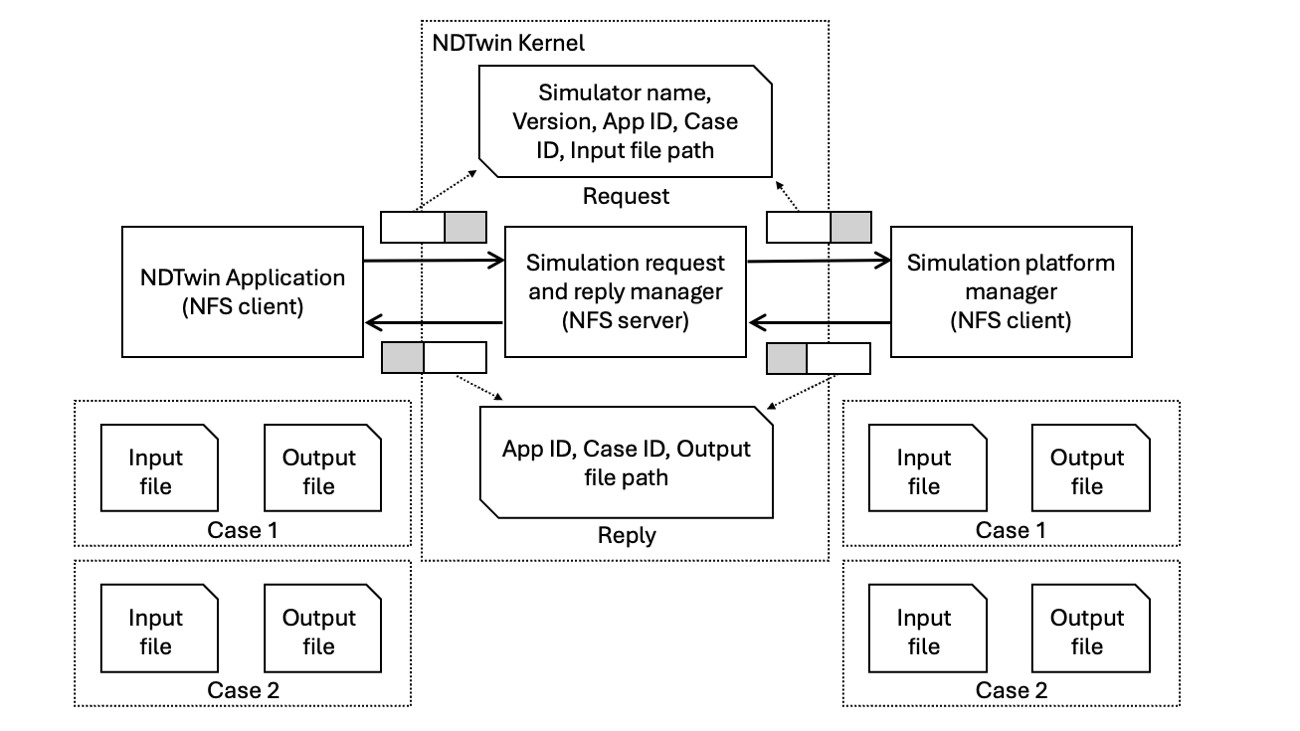
The system comprises three main components:
i. NDTwin Application This component analyzes system states to generate candidate simulation cases. It handles data preparation by storing input files on the shared Network File System (NFS) and subsequently dispatches simulation requests to the NDTwin Kernel.
ii. Simulation request and reply manager Acts as the central communication bridge, relaying requests and replies between the NDTwin Application and the simulation platform.
iii. Simulation platform manager Handles the heavy lifting. This server receives simulation cases and dispatches each case to the specified simulator, then forks worker processes to run simulations in parallel across multiple CPU cores. It evaluates the outcomes, writes results back to NFS, and sends a completion reply to the NDTwin Kernel so the NDTwin Application can be notified.
2. Workflow Execution Cycle
- Initiation: The NDTwin Application generates simulation scenarios, writes the input data to NFS, and signals the NDTwin Kernel.
- Processing: The simulation platform reads the inputs, executes simulations in parallel, and writes the results back to NFS.
- Completion & Decision:
- The NDTwin Application waits for replies confirming all cases are finished.
- It reads the output files from NFS to retrieve the detailed results.
- It compares the outcomes to select the optimal plan.
- Execution: The NDTwin Application instructs the NDTwin Kernel to execute network changes based on the selected best plan.
3. Data Exchange: Network File System (NFS)
Why NFS? Simulation inputs and outputs often contain large datasets that are inefficient to transfer via RESTful API calls. NFS provides a high-performance mechanism for sharing this data.
Roles and Responsibilities
- NDTwin Kernel (NFS Server): Exports file directories, acting as the central storage hub.
- NDTwin Application & Simulation platform manager (NFS Clients): Mount these directories to perform direct read/write operations.
4. Integration Workflow
This section provides developers with a comprehensive walkthrough on how to register applications, prepare distributed simulation tasks, and handle asynchronous results within the NDTwin ecosystem
Step 1: Application Registration
Before running simulations, your app must register. The server will assign a unique app_id and create a dedicated folder in the NFS directory (e.g., /srv/nfs/sim/<app_id>) for your data.
Endpoint: POST /ndt/app_register
Request Example:
{
  "app_name": "PowerOptimizer",
  "simulation_completed_url": "http://192.168.100.5:9000/simulation_completed"
}
Success Response:
{
  "app_id": 1,
  "message": "Application registered successfully"
}
Step 2: Preparing Simulation Files (NFS)
After receiving your app_id, use your dedicated NFS folder to store simulation inputs.
Directory Structure Convention:
/srv/nfs/sim/<app_id>/<case_id>.json
Note: Ensure your application has the necessary permissions to write to the NFS export directory before proceeding to the dispatch step.
Step 3: Dispatching a Simulation Case
Once your input file is ready, notify the NDTwin server to dispatch the case to the simulator.
Endpoint: POST /ndt/received_a_simulation_case
Request Parameters:
| Field | Type | Description |
|---|---|---|
simulator | string | Name of the simulator (e.g., “MySimulator”). |
version | string | Version identifier (e.g., “1.0.0”). |
app_id | string | Your assigned identifier. |
case_id | string | A unique ID generated by your App for this case. |
inputfile | string | The full NFS path to the input description. |
Example Body:
{
  "simulator": "MySimulator",
  "version": "1.0.0",
  "app_id": "1",
  "case_id": "case_123",
  "inputfile": "/srv/nfs/sim/1/case_123.json"
}
Step 4: Receiving Simulation Results
When the external simulator finishes, it calls NDTwin, which then forwards the result to your simulation_completed_url via a POST request.
Triggered Endpoint (on your App): POST /simulation_completed (as defined in Step 1)
Payload from NDTwin:
{
  "app_id": "1",
  "case_id": "case_123",
  "outputfile": "/srv/nfs/sim/1/case_123_result.json"
}
Developer Action: 1. Parse the case_id to identify which task finished.
2. Read the result from the outputfile path in the NFS.
3. Execute necessary network adjustments or decision logic.
Reference
Error Handling Reference
The NDTwin API uses standard HTTP status codes. Below are common error responses:
| Status Code | Error Message | Cause |
|---|---|---|
| 400 Bad Request | Missing or invalid 'appName' | Required fields are empty or incorrectly formatted. |
| 400 Bad Request | JSON parsing error | The request body is not valid JSON. |
| 500 Internal Error | Internal server error | Unexpected runtime error or system failure. |
Summary Table of Operations
| Operation | Method | Endpoint |
|---|---|---|
| Registration | POST | /ndt/app_register |
| Dispatch Case | POST | /ndt/received_a_simulation_case |
| Notify Completion | POST | /ndt/simulation_completed |
See more NDTwin API docs in NDTwin API.
See an end-to-end example in the Energy-Saving App and the Simulation Platform Manager, or watch the demo video here.